Follow these simple steps to create and order a sweaters using the MTM.Design platform.
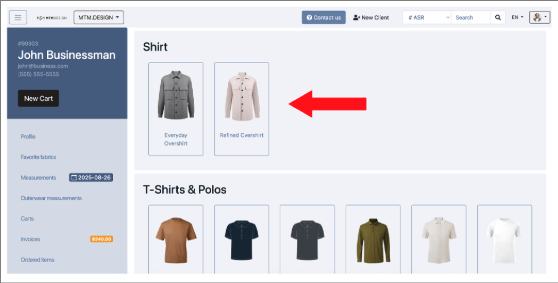
1 – Select Your Style
From the builder, go to the Shirt section & Select the style you want
2 – Add Measurements
To add finished measurements to your item:
Go to the Measurement page
Use Overshirt measurement
Add Finished or Bespoke Measurement

-
Retail pricing cannot be set up at the moment.
Cost for Overshirt (USD):
Shirt CMT + Fabric price
Need help measuring?
You can refer to our shirt measurement guide here: How to Measure a Shirt
Tips while measuring:
- Consider increasing bicep and chest; if the overshirt is layered you will need more room.
- Make sure back length is appropriate if it's being left untucked.
Was this article helpful?
That’s Great!
Thank you for your feedback
Sorry! We couldn't be helpful
Thank you for your feedback
Feedback sent
We appreciate your effort and will try to fix the article